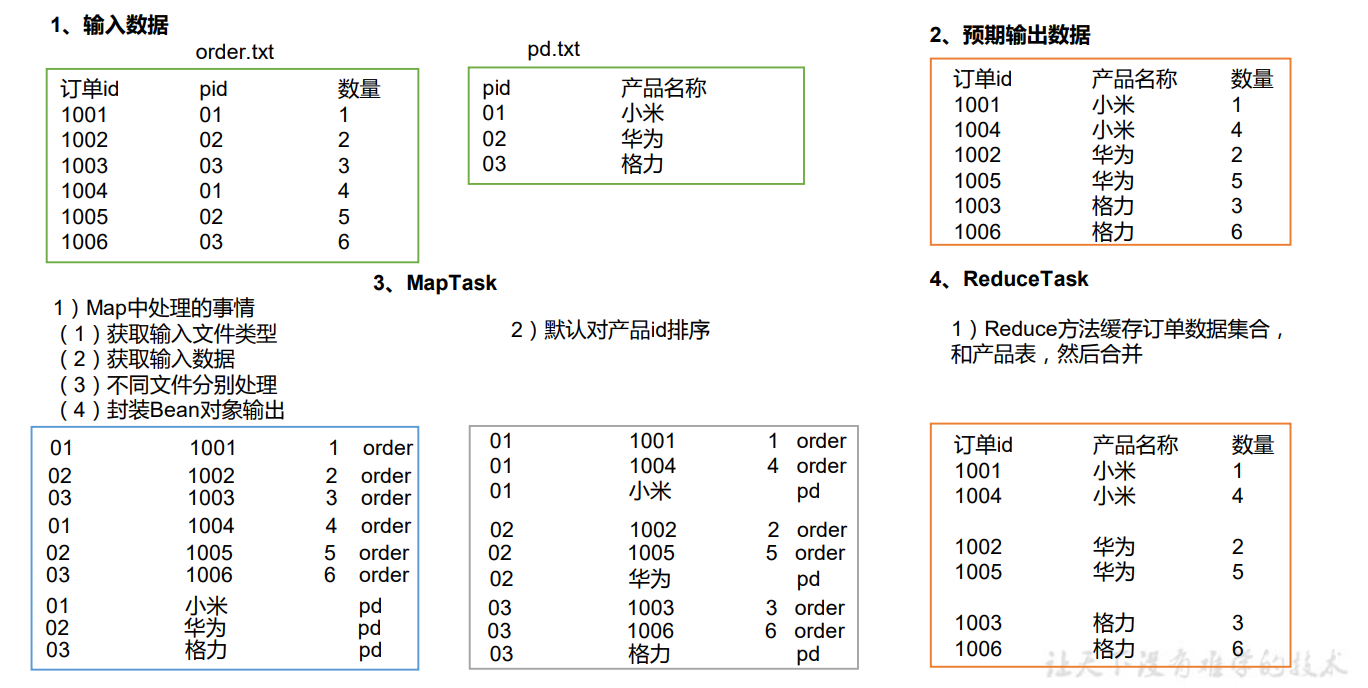
一:Reduce Join Map 端的主要工作:为来自不同表或文件的 key/value 对,打标签以区别不同来源的记 录。然后用连接字段作为 key,其余部分和新加的标志作为 value,最后进行输出。
Reduce 端的主要工作:在 Reduce 端以连接字段作为 key 的分组已经完成,我们只需要 在每一个分组当中将那些来源于不同文件的记录(在 Map 阶段已经打标志)分开,最后进 行合并就 ok 了。
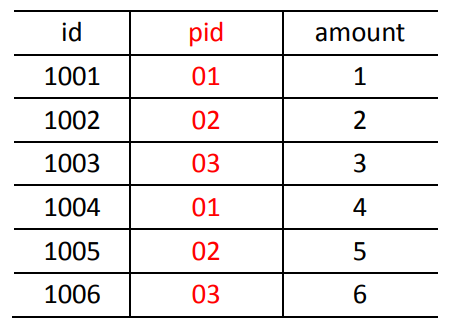
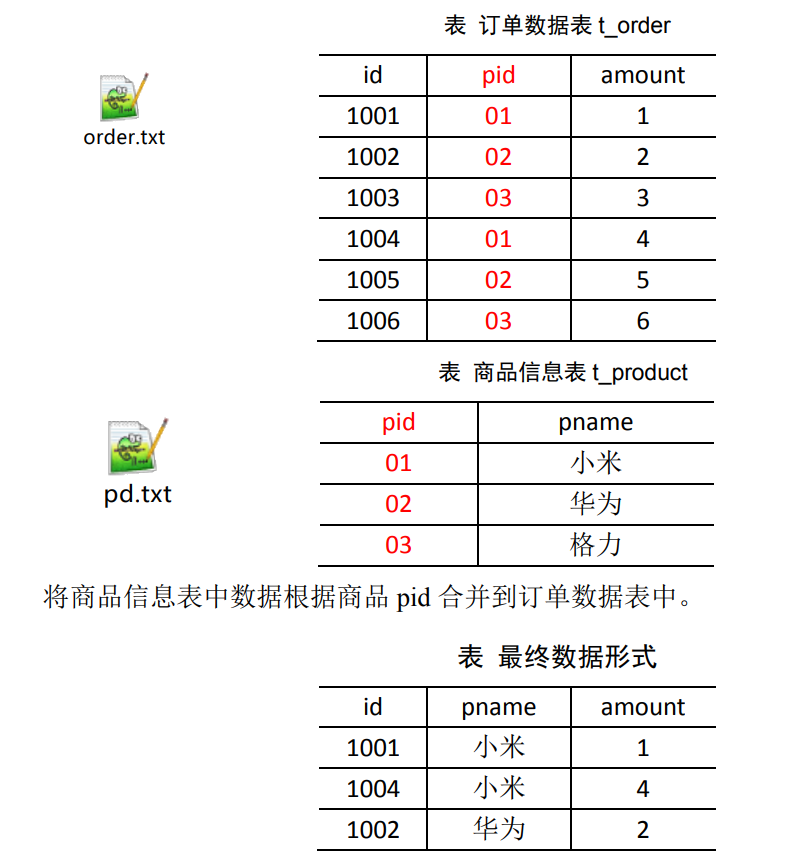
二:Reduce Join 案例实操 2.1 需求 订单数据表
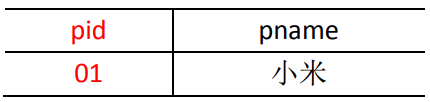
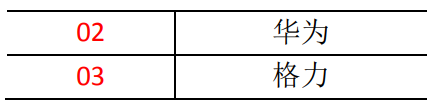
商品信息表
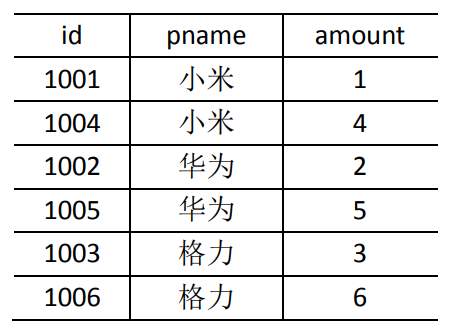
将商品信息表中数据根据商品 pid 合并到订单数据表中。
最终数据形式:
2.2 需求分析 通过将关联条件作为 Map 输出的 key,将两表满足 Join 条件的数据并携带数据所来源 的文件信息,发往同一个 ReduceTask,在 Reduce 中进行数据的串联。
2.3 Reduce端表合并(数据倾斜)
2.4 代码实现 (1)创建商品和订单合并后的 TableBean 类 1 2 3 4 5 6 7 8 9 10 11 12 13 14 15 16 17 18 19 20 21 22 23 24 25 26 27 28 29 30 31 32 33 34 35 36 37 38 39 40 41 42 43 44 45 46 47 48 49 50 51 package cn.aiyingke.mapreduce.reduceJoin;import lombok.Getter;import lombok.NoArgsConstructor;import lombok.Setter;import org.apache.hadoop.io.Writable;import java.io.DataInput;import java.io.DataOutput;import java.io.IOException;@NoArgsConstructor @Getter @Setter public class TableBean implements Writable { private String id; private String pid; private int amount; private String pName; private String flag; @Override public String toString () { return id + "\t" + pName + "\t" + amount; } @Override public void write (DataOutput dataOutput) throws IOException { dataOutput.writeUTF(id); dataOutput.writeUTF(pid); dataOutput.writeInt(amount); dataOutput.writeUTF(pName); dataOutput.writeUTF(flag); } @Override public void readFields (DataInput dataInput) throws IOException { this .id = dataInput.readUTF(); this .pid = dataInput.readUTF(); this .amount = dataInput.readInt(); this .pName = dataInput.readUTF(); this .flag = dataInput.readUTF(); } }
(2)编写 TableMapper 类 1 2 3 4 5 6 7 8 9 10 11 12 13 14 15 16 17 18 19 20 21 22 23 24 25 26 27 28 29 30 31 32 33 34 35 36 37 38 39 40 41 42 43 44 45 46 47 48 49 50 51 52 53 54 55 56 57 58 59 60 61 62 package cn.aiyingke.mapreduce.reduceJoin;import org.apache.hadoop.io.LongWritable;import org.apache.hadoop.io.Text;import org.apache.hadoop.mapreduce.InputSplit;import org.apache.hadoop.mapreduce.Mapper;import org.apache.hadoop.mapreduce.lib.input.FileSplit;import java.io.IOException;public class TableMapper extends Mapper <LongWritable, Text, Text, TableBean> { private String filename; private Text outK = new Text (); private TableBean outV = new TableBean (); @Override protected void setup (Mapper<LongWritable, Text, Text, TableBean>.Context context) throws IOException, InterruptedException { InputSplit split = context.getInputSplit(); FileSplit fileSplit = (FileSplit) split; filename = fileSplit.getPath().getName(); } @Override protected void map (LongWritable key, Text value, Mapper<LongWritable, Text, Text, TableBean>.Context context) throws IOException, InterruptedException { String line = value.toString(); String[] split = line.split("\t" ); if (filename.contains("order" )) { outK.set(split[1 ]); outV.setId(split[0 ]); outV.setPid(split[1 ]); outV.setAmount(Integer.parseInt(split[2 ])); outV.setPName(" " ); outV.setFlag("order" ); } else { outK.set(split[0 ]); outV.setId(" " ); outV.setPid(split[0 ]); outV.setAmount(0 ); outV.setPName(split[1 ]); outV.setFlag("pd" ); } context.write(outK, outV); } }
(3)编写 TableReducer 类 1 2 3 4 5 6 7 8 9 10 11 12 13 14 15 16 17 18 19 20 21 22 23 24 25 26 27 28 29 30 31 32 33 34 35 36 37 38 39 40 41 42 43 44 45 46 47 48 49 50 51 52 53 54 55 package cn.aiyingke.mapreduce.reduceJoin;import org.apache.commons.beanutils.BeanUtils;import org.apache.hadoop.io.NullWritable;import org.apache.hadoop.io.Text;import org.apache.hadoop.mapreduce.Reducer;import java.io.IOException;import java.lang.reflect.InvocationTargetException;import java.util.ArrayList;public class TableReducer extends Reducer <Text, TableBean, TableBean, NullWritable> { @Override protected void reduce (Text key, Iterable<TableBean> values, Reducer<Text, TableBean, TableBean, NullWritable>.Context context) throws IOException, InterruptedException { ArrayList<TableBean> orderBeans = new ArrayList <>(); TableBean pdBean = new TableBean (); for (TableBean value : values) { if ("order" .equals(value.getFlag())) { TableBean tmpOrderBean = new TableBean (); try { BeanUtils.copyProperties(tmpOrderBean, value); } catch (InvocationTargetException | IllegalAccessException e) { throw new RuntimeException (e); } orderBeans.add(tmpOrderBean); } else { try { BeanUtils.copyProperties(pdBean,value); } catch (InvocationTargetException | IllegalAccessException e) { throw new RuntimeException (e); } } } for (TableBean orderBean : orderBeans) { orderBean.setPName(pdBean.getPName()); context.write(orderBean,NullWritable.get()); } } }
(4)编写 TableDriver 类 1 2 3 4 5 6 7 8 9 10 11 12 13 14 15 16 17 18 19 20 21 22 23 24 25 26 27 28 29 30 31 32 33 34 35 36 37 38 package cn.aiyingke.mapreduce.reduceJoin;import org.apache.hadoop.conf.Configuration;import org.apache.hadoop.fs.Path;import org.apache.hadoop.io.NullWritable;import org.apache.hadoop.io.Text;import org.apache.hadoop.mapreduce.Job;import org.apache.hadoop.mapreduce.lib.input.FileInputFormat;import org.apache.hadoop.mapreduce.lib.output.FileOutputFormat;import java.io.IOException;public class TableDriver { public static void main (String[] args) throws IOException, InterruptedException, ClassNotFoundException { Job job = Job.getInstance(new Configuration ()); job.setJarByClass(TableDriver.class); job.setMapperClass(TableMapper.class); job.setReducerClass(TableReducer.class); job.setMapOutputKeyClass(Text.class); job.setMapOutputValueClass(TableBean.class); job.setOutputKeyClass(TableBean.class); job.setOutputValueClass(NullWritable.class); FileInputFormat.setInputPaths(job, new Path ("Y:\\Temp\\input\\" )); FileOutputFormat.setOutputPath(job, new Path ("Y:\\Temp\\output5\\" )); boolean b = job.waitForCompletion(true ); System.exit(b ? 0 : 1 ); } }
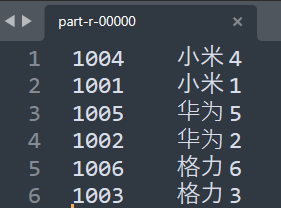
(5)运行结果 (6)总结 缺点:这种方式中,合并的操作是在 Reduce 阶段完成,Reduce 端的处理压力太大,Map 节点的运算负载则很低,资源利用率不高,且在 Reduce 阶段极易产生数据倾斜。
解决方案:Map 端实现数据合并。
三:Map Join 3.1 应用场景 Map Join 适用于一张表十分小、一张表很大的场景。
3.2 优点 在 Reduce 端处理过多的表,非常容易产生数据倾斜;
在 Map 端缓存多张表,提前处理业务逻辑,这样增加 Map 端业务,减少 Reduce 端数 据的压力,尽可能的减少数据倾斜。
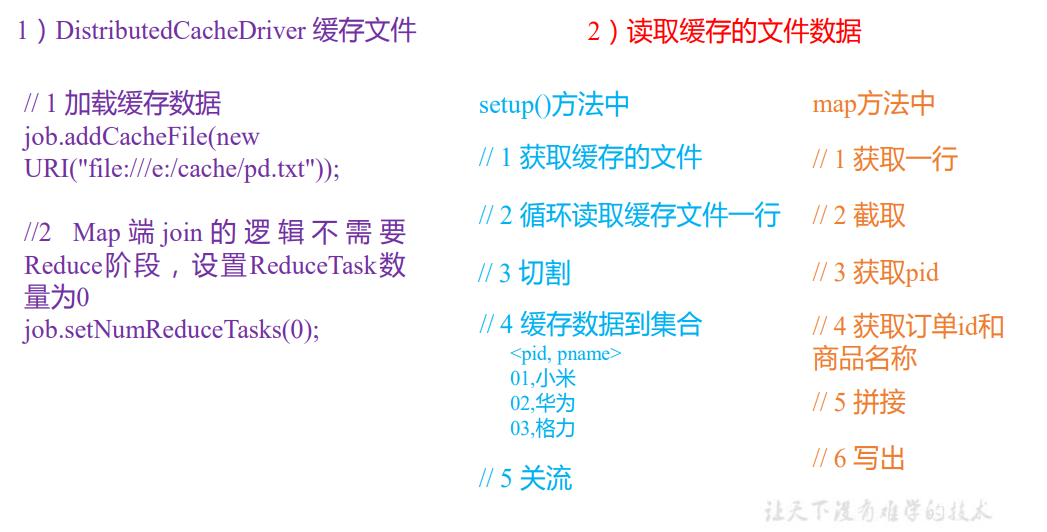
3.3 实现手段——采用 DistributedCache (1)在 Mapper 的 setup 阶段,将文件读取到缓存集合中。
(2)在 Driver 驱动类中加载缓存。
1 2 3 4 job.addCacheFile(new URI ("file:///y:/Temp/input/pd.txt" )); job.addCacheFile(new URI ("hdfs://hadoop101:8020/tmp/cache/pd.txt" ));
四:Map Join 案例实操 4.1 需求
4.2 需求分析 MapJoin 适用于关联表中有小表的情形;
4.3 代码实现 (1)先在 MapJoinDriver 驱动类中添加缓存文件 1 2 3 4 5 6 7 8 9 10 11 12 13 14 15 16 17 18 19 20 21 22 23 24 25 26 27 28 29 30 31 32 33 34 35 36 37 38 39 40 41 42 43 44 45 46 47 48 49 package cn.aiyingke.mapreduce.mapJoin;import org.apache.hadoop.conf.Configuration;import org.apache.hadoop.fs.Path;import org.apache.hadoop.io.NullWritable;import org.apache.hadoop.io.Text;import org.apache.hadoop.mapreduce.Job;import org.apache.hadoop.mapreduce.lib.input.FileInputFormat;import org.apache.hadoop.mapreduce.lib.output.FileOutputFormat;import java.io.IOException;import java.net.URI;import java.net.URISyntaxException;public class TableDriver { public static void main (String[] args) throws IOException, InterruptedException, ClassNotFoundException, URISyntaxException { Job job = Job.getInstance(new Configuration ()); job.setJarByClass(TableDriver.class); job.setMapperClass(TableMapper.class); job.setMapOutputKeyClass(Text.class); job.setMapOutputValueClass(NullWritable.class); job.setOutputKeyClass(Text.class); job.setOutputValueClass(NullWritable.class); job.addCacheFile(new URI ("file:///Y:/Temp/pd.txt" )); job.setNumReduceTasks(0 ); FileInputFormat.setInputPaths(job, new Path ("Y:\\Temp\\input\\" )); FileOutputFormat.setOutputPath(job, new Path ("Y:\\Temp\\output2\\" )); boolean b = job.waitForCompletion(true ); System.exit(b ? 0 : 1 ); } }
(2)在 MapJoinMapper 类中的 setup 方法中读取缓存文件 1 2 3 4 5 6 7 8 9 10 11 12 13 14 15 16 17 18 19 20 21 22 23 24 25 26 27 28 29 30 31 32 33 34 35 36 37 38 39 40 41 42 43 44 45 46 47 48 49 50 51 52 53 54 55 56 57 58 59 60 61 62 63 64 65 66 67 68 69 package cn.aiyingke.mapreduce.mapJoin;import org.apache.commons.lang3.StringUtils;import org.apache.hadoop.fs.FSDataInputStream;import org.apache.hadoop.fs.FileSystem;import org.apache.hadoop.fs.Path;import org.apache.hadoop.io.IOUtils;import org.apache.hadoop.io.LongWritable;import org.apache.hadoop.io.NullWritable;import org.apache.hadoop.io.Text;import org.apache.hadoop.mapreduce.Mapper;import java.io.BufferedReader;import java.io.IOException;import java.io.InputStreamReader;import java.net.URI;import java.nio.charset.StandardCharsets;import java.util.HashMap;import java.util.Map;public class TableMapper extends Mapper <LongWritable, Text, Text, NullWritable> { private Map<String, String> pdMap = new HashMap <>(); private Text text = new Text (); @Override protected void setup (Mapper<LongWritable, Text, Text, NullWritable>.Context context) throws IOException, InterruptedException { final URI[] cacheFiles = context.getCacheFiles(); final Path path = new Path (cacheFiles[0 ]); final FileSystem fileSystem = FileSystem.get(context.getConfiguration()); final FSDataInputStream open = fileSystem.open(path); BufferedReader reader = new BufferedReader (new InputStreamReader (open, StandardCharsets.UTF_8)); String line; while (StringUtils.isNotEmpty(line = reader.readLine())) { final String[] split = line.split("\t" ); pdMap.put(split[0 ], split[1 ]); } IOUtils.closeStream(reader); } @Override protected void map (LongWritable key, Text value, Mapper<LongWritable, Text, Text, NullWritable>.Context context) throws IOException, InterruptedException { final String[] split = value.toString().split("\t" ); final String pName = pdMap.get(split[1 ]); text.set(split[0 ] + "\t" + pName + "\t" + split[2 ]); context.write(text, NullWritable.get()); } }