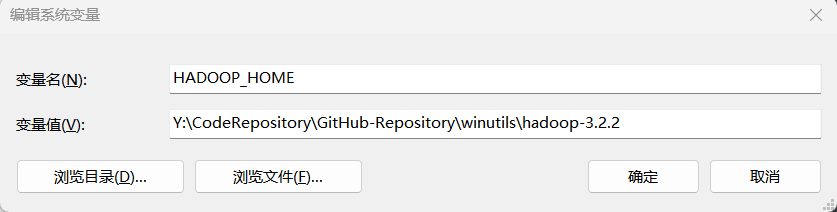
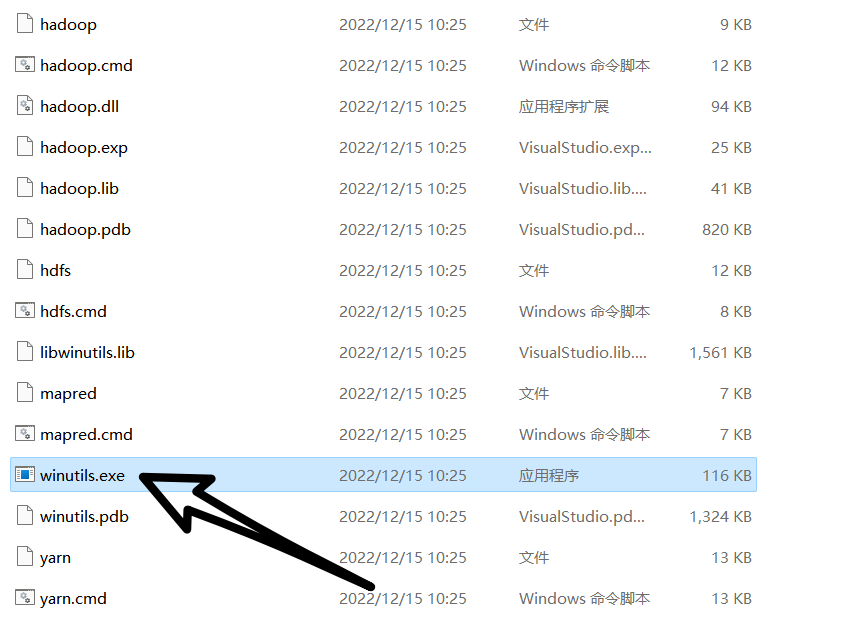
一:客户端环境准备 1.1 下载并安装 Windows 依赖 cdarlint/winutils: winutils.exe hadoop.dll and hdfs.dll binaries for hadoop windows (github.com)
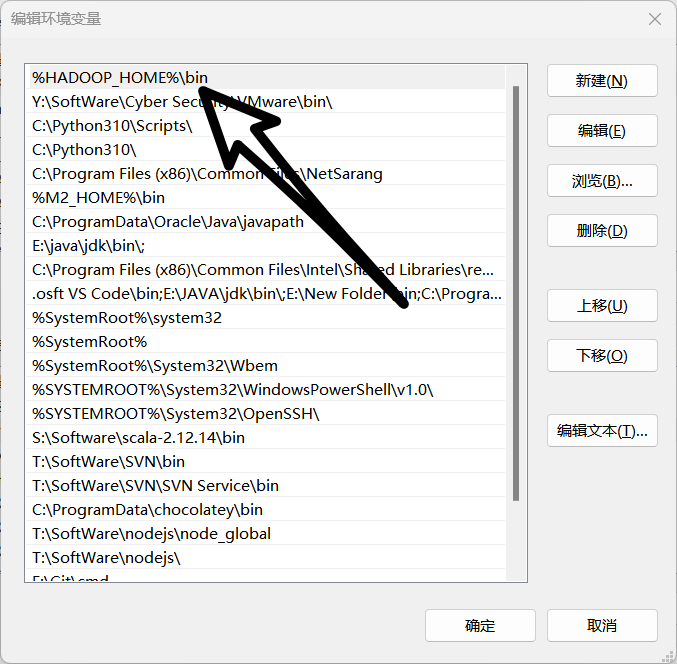
1.2 配置环境变量
1.3 双击运行
二:IDEA 实例测试 2.1 添加maven 依赖 1 2 3 4 5 6 7 8 9 10 11 12 13 14 15 16 17 <dependencies > <dependency > <groupId > org.apache.hadoop</groupId > <artifactId > hadoop-client</artifactId > <version > 3.2.2</version > </dependency > <dependency > <groupId > junit</groupId > <artifactId > junit</artifactId > <version > 4.13.2</version > </dependency > <dependency > <groupId > org.slf4j</groupId > <artifactId > slf4j-log4j12</artifactId > <version > 1.7.32</version > </dependency > </dependencies >
2.2 配置日志 在项目的 src/main/resources 目录下,新建一个文件,命名为“log4j.properties”,在文件中填入:
1 2 3 4 5 6 7 8 log4j.rootLogger =INFO, stdout log4j.appender.stdout =org.apache.log4j.ConsoleAppender log4j.appender.stdout.layout =org.apache.log4j.PatternLayout log4j.appender.stdout.layout.ConversionPattern =%d %p [%c] - %m%n log4j.appender.logfile =org.apache.log4j.FileAppender log4j.appender.logfile.File =target/spring.log log4j.appender.logfile.layout =org.apache.log4j.PatternLayout log4j.appender.logfile.layout.ConversionPattern =%d %p [%c] - %m%n
2.3 代码实现 1 2 3 4 5 6 7 8 9 10 11 12 13 14 15 16 17 18 19 20 21 22 23 24 25 26 27 28 29 30 31 package cn.aiyingke.hdfs;import org.apache.hadoop.conf.Configuration;import org.apache.hadoop.fs.FileSystem;import org.apache.hadoop.fs.Path;import org.junit.Test;import java.io.IOException;import java.net.URI;import java.net.URISyntaxException;public class hdfsClient { @Test public void testMkdirs () throws URISyntaxException, IOException, InterruptedException { final Configuration configuration = new Configuration (); final FileSystem fileSystem = FileSystem.get(new URI ("hdfs://hadoop100:8020" ), configuration, "ghost" ); fileSystem.mkdirs(new Path ("/ghost" )); fileSystem.close(); } }
2.4 执行程序 客户端去操作 HDFS 时,是有一个用户身份的。默认情况下,HDFS 客户端 API 会从采 用 Windows 默认用户访问 HDFS,会报权限异常错误。所以在访问 HDFS 时,一定要配置 用户。
三:API 案例操作 3.1 HDFS 文件上传 (1)代码实现 1 2 3 4 5 6 7 8 9 10 11 12 13 14 15 16 17 18 19 20 21 22 23 24 25 26 27 28 29 30 31 package cn.aiyingke.hdfs;import org.apache.hadoop.conf.Configuration;import org.apache.hadoop.fs.FileSystem;import org.apache.hadoop.fs.Path;import org.junit.Test;import java.io.IOException;import java.net.URI;import java.net.URISyntaxException;public class ApiDemo { @Test public void testCopyFromLocalFile () throws URISyntaxException, IOException, InterruptedException { final Configuration configuration = new Configuration (); final FileSystem fileSystem = FileSystem.get(new URI ("hdfs://hadoop100:8020" ), configuration, "ghost" ); fileSystem.copyFromLocalFile(false , false , new Path ("Y:\\Temp\\lol.txt" ), new Path ("/lol/lol.txt" )); fileSystem.close(); } }
(2)重构代码(代码模板) 1 2 3 4 5 6 7 8 9 10 11 12 13 14 15 16 17 18 19 20 21 22 23 24 25 26 27 28 29 30 31 32 33 34 35 36 37 38 39 40 41 42 43 package cn.aiyingke.hdfs;import org.apache.hadoop.conf.Configuration;import org.apache.hadoop.fs.FileSystem;import org.apache.hadoop.fs.Path;import org.junit.After;import org.junit.Before;import org.junit.Test;import java.io.IOException;import java.net.URI;import java.net.URISyntaxException;public class ApiDemo { private FileSystem fileSystem; @Before public void init () throws URISyntaxException, IOException, InterruptedException { final Configuration configuration = new Configuration (); fileSystem = FileSystem.get(new URI ("hdfs://hadoop100:8020" ), configuration, "ghost" ); } @After public void close () throws IOException { fileSystem.close(); } @Test public void testCopyFromLocalFile () throws IOException { fileSystem.copyFromLocalFile(true , true , new Path ("Y:\\Temp\\lol.txt" ), new Path ("/lol/lol.txt" )); } }
(3)参数优先级 参数优先级排序:(1)客户端代码中设置的值 >(2)ClassPath 下的用户自定义配置文 件 >(3)然后是服务器的自定义配置(xxx-site.xml)>(4)服务器的默认配置(xxx-default.xml)
将 hdfs-site.xml 拷贝到项目的 resources 资源目录下;
1 2 3 4 5 6 7 8 9 10 11 12 <?xml version="1.0" encoding="UTF-8" ?> <?xml-stylesheet type="text/xsl" href="configuration.xsl" ?> <configuration > <property > <name > dfs.replication</name > <value > 2</value > <description > Default block replication. The actual number of replications can be specified when the file is created. The default is used if replication is not specified in create time. </description > </property > </configuration >
在代码中设置 副本数量测试:
1 2 3 4 5 6 7 8 9 10 11 12 13 14 15 16 17 18 19 20 21 22 23 24 25 26 27 28 29 30 31 32 33 34 35 36 37 38 39 40 41 42 43 44 package cn.aiyingke.hdfs;import org.apache.hadoop.conf.Configuration;import org.apache.hadoop.fs.FileSystem;import org.apache.hadoop.fs.Path;import org.junit.After;import org.junit.Before;import org.junit.Test;import java.io.IOException;import java.net.URI;import java.net.URISyntaxException;public class ApiDemo { private FileSystem fileSystem; @Before public void init () throws URISyntaxException, IOException, InterruptedException { final Configuration configuration = new Configuration (); configuration.set("dfs.replication" , "1" ); fileSystem = FileSystem.get(new URI ("hdfs://hadoop100:8020" ), configuration, "ghost" ); } @After public void close () throws IOException { fileSystem.close(); } @Test public void testCopyFromLocalFile () throws IOException { fileSystem.copyFromLocalFile(false , true , new Path ("Y:\\Temp\\lol.txt" ), new Path ("/lol/lol.txt" )); } }
3.2 HDFS 文件下载 1 2 3 4 5 @Test public void testCopyFromLocalFile () throws IOException { fileSystem.copyFromLocalFile(false , true , new Path ("Y:\\Temp\\lol.txt" ), new Path ("/lol/lol.txt" )); }
3.3 HDFS 文件更名和移动 1 2 3 4 5 6 7 @Test public void testMv () throws IOException { fileSystem.rename(new Path ("/jinguo/shuguo.txt" ), new Path ("/sanguo/wangguo.txt" )); }
3.4 HDFS 删除文件和目录 1 2 3 4 5 @Test public void testDelete () throws IOException { fileSystem.delete(new Path ("/jinguo/wuguo.txt" ), true ); }
3.5 HDFS 文件详情查看 1 2 3 4 5 6 7 8 9 10 11 12 13 14 15 16 17 18 19 20 21 22 23 @Test public void testFileInfo () throws IOException { RemoteIterator<LocatedFileStatus> remoteIterator = fileSystem.listFiles(new Path ("/" ), true ); while (remoteIterator.hasNext()) { LocatedFileStatus fileStatus = remoteIterator.next(); System.out.println("======" + fileStatus.getPath() + "======" ); System.out.println(fileStatus.getPermission()); System.out.println(fileStatus.getOwner()); System.out.println(fileStatus.getGroup()); System.out.println(fileStatus.getLen()); System.out.println(fileStatus.getModificationTime()); System.out.println(fileStatus.getReplication()); System.out.println(fileStatus.getBlockSize()); System.out.println(fileStatus.getPath().getName()); BlockLocation[] blockLocations = fileStatus.getBlockLocations(); System.out.println(Arrays.toString(blockLocations)); } }
3.6 HDFS 文件和文件夹判断 1 2 3 4 5 6 7 8 9 10 11 12 @Test public void testListStatus () throws IOException { final FileStatus[] fileStatuses = fileSystem.listStatus(new Path ("/" )); for (FileStatus fileStatus : fileStatuses) { if (fileStatus.isFile()) { System.out.println("file:" + fileStatus.getPath().getName()); } else { System.out.println("dir:" + fileStatus.getPath().getName()); } } }
3.7 全部代码 1 2 3 4 5 6 7 8 9 10 11 12 13 14 15 16 17 18 19 20 21 22 23 24 25 26 27 28 29 30 31 32 33 34 35 36 37 38 39 40 41 42 43 44 45 46 47 48 49 50 51 52 53 54 55 56 57 58 59 60 61 62 63 64 65 66 67 68 69 70 71 72 73 74 75 76 77 78 79 80 81 82 83 84 85 86 87 88 89 90 91 92 93 94 95 96 97 98 99 100 101 package cn.aiyingke.hdfs;import org.apache.hadoop.conf.Configuration;import org.apache.hadoop.fs.*;import org.junit.After;import org.junit.Before;import org.junit.Test;import java.io.IOException;import java.net.URI;import java.net.URISyntaxException;import java.util.Arrays;public class ApiDemo { private FileSystem fileSystem; @Before public void init () throws URISyntaxException, IOException, InterruptedException { final Configuration configuration = new Configuration (); configuration.set("dfs.replication" , "1" ); fileSystem = FileSystem.get(new URI ("hdfs://hadoop100:8020" ), configuration, "ghost" ); } @After public void close () throws IOException { fileSystem.close(); } @Test public void testCopyFromLocalFile () throws IOException { fileSystem.copyFromLocalFile(false , true , new Path ("Y:\\Temp\\lol.txt" ), new Path ("/lol/lol.txt" )); } @Test public void testCopyToLocalFile () throws IOException { fileSystem.copyToLocalFile(false , new Path ("/jinguo" ), new Path ("Y:\\Temp\\" ), true ); } @Test public void testMv () throws IOException { fileSystem.rename(new Path ("/jinguo/shuguo.txt" ), new Path ("/sanguo/wangguo.txt" )); } @Test public void testDelete () throws IOException { fileSystem.delete(new Path ("/jinguo/wuguo.txt" ), true ); } @Test public void testFileInfo () throws IOException { RemoteIterator<LocatedFileStatus> remoteIterator = fileSystem.listFiles(new Path ("/" ), true ); while (remoteIterator.hasNext()) { LocatedFileStatus fileStatus = remoteIterator.next(); System.out.println("======" + fileStatus.getPath() + "======" ); System.out.println(fileStatus.getPermission()); System.out.println(fileStatus.getOwner()); System.out.println(fileStatus.getGroup()); System.out.println(fileStatus.getLen()); System.out.println(fileStatus.getModificationTime()); System.out.println(fileStatus.getReplication()); System.out.println(fileStatus.getBlockSize()); System.out.println(fileStatus.getPath().getName()); BlockLocation[] blockLocations = fileStatus.getBlockLocations(); System.out.println(Arrays.toString(blockLocations)); } } @Test public void testListStatus () throws IOException { final FileStatus[] fileStatuses = fileSystem.listStatus(new Path ("/" )); for (FileStatus fileStatus : fileStatuses) { if (fileStatus.isFile()) { System.out.println("file:" + fileStatus.getPath().getName()); } else { System.out.println("dir:" + fileStatus.getPath().getName()); } } } }