一:需求 对本地 WordCount.txt 文件进行词频统计,其内容均按 “,”分割,将统计结果输出到 outputDir 目录下;
二:代码实现 2.1 环境引入 (1)Maven 依赖 1 2 3 4 5 6 7 8 9 10 11 12 13 14 15 16 17 <dependencies > <dependency > <groupId > org.apache.hadoop</groupId > <artifactId > hadoop-client</artifactId > <version > 3.3.2</version > </dependency > <dependency > <groupId > junit</groupId > <artifactId > junit</artifactId > <version > 4.13.2</version > </dependency > <dependency > <groupId > org.slf4j</groupId > <artifactId > slf4j-log4j12</artifactId > <version > 2.0.5</version > </dependency > </dependencies >
(2)配置日志 在项目的 src/main/resources 目录下,新建一个文件,命名为“log4j.properties”,在 文件中填入。
1 2 3 4 5 6 7 8 log4j.rootLogger =INFO, stdout log4j.appender.stdout =org.apache.log4j.ConsoleAppender log4j.appender.stdout.layout =org.apache.log4j.PatternLayout log4j.appender.stdout.layout.ConversionPattern =%d %p [%c] - %m%n log4j.appender.logfile =org.apache.log4j.FileAppender log4j.appender.logfile.File =target/spring.log log4j.appender.logfile.layout =org.apache.log4j.PatternLayout log4j.appender.logfile.layout.ConversionPattern =%d %p [%c] - %m%n
2.2 编写代码 创建包 cn.aiyingke.mapreduce.wordcount
(1)Driver 类 1 2 3 4 5 6 7 8 9 10 11 12 13 14 15 16 17 18 19 20 21 22 23 24 25 26 27 28 29 30 31 32 33 34 35 36 37 38 39 40 41 42 43 44 45 46 47 48 49 50 51 52 53 54 55 56 57 58 59 60 61 62 63 64 65 66 67 68 69 70 package driver;import mapper.WordCountMapper;import org.apache.hadoop.conf.Configuration;import org.apache.hadoop.fs.Path;import org.apache.hadoop.io.IntWritable;import org.apache.hadoop.io.Text;import org.apache.hadoop.mapreduce.Job;import org.apache.hadoop.mapreduce.lib.input.FileInputFormat;import org.apache.hadoop.mapreduce.lib.output.FileOutputFormat;import reducer.WordCountReducer;import java.io.IOException;public class WordCountDriver { public static void main (String[] args) throws IOException, InterruptedException, ClassNotFoundException { Configuration configuration = new Configuration (); Job job = Job.getInstance(configuration, "WordCount-MR" ); job.setJarByClass(WordCountDriver.class); job.setMapperClass(WordCountMapper.class); job.setCombinerClass(WordCountReducer.class); job.setReducerClass(WordCountReducer.class); job.setOutputKeyClass(Text.class); job.setOutputValueClass(IntWritable.class); FileInputFormat.addInputPath(job, new Path ("S:\\Software\\IDEA 2021.1.2\\IDEA-workspace\\Rupert-Tears\\MapReduce\\WordCount\\data\\instanceData\\WordCount.txt" )); FileOutputFormat.setOutputPath(job, new Path ("S:\\Software\\IDEA 2021.1.2\\IDEA-workspace\\Rupert-Tears\\MapReduce\\WordCount\\data\\outputDir" )); System.exit(job.waitForCompletion(true ) ? 0 : 1 ); } }
(2)Mapper 类 1 2 3 4 5 6 7 8 9 10 11 12 13 14 15 16 17 18 19 20 21 22 23 24 25 26 27 28 29 30 31 32 33 34 35 36 37 38 39 40 41 42 43 44 45 46 package mapper;import org.apache.hadoop.io.IntWritable;import org.apache.hadoop.io.Text;import org.apache.hadoop.mapreduce.Mapper;import java.io.IOException;import java.util.StringTokenizer;public class WordCountMapper extends Mapper <Object, Text, Text, IntWritable> { IntWritable intWritable = new IntWritable (1 ); Text text = new Text (); @Override protected void map (Object key, Text value, Mapper<Object, Text, Text, IntWritable>.Context context) throws IOException, InterruptedException { StringTokenizer stringTokenizer = new StringTokenizer (value.toString(), "," ); while (stringTokenizer.hasMoreTokens()) { String word = stringTokenizer.nextToken(); text.set(word); context.write(text, intWritable); } } }
(3)Reducer 类 1 2 3 4 5 6 7 8 9 10 11 12 13 14 15 16 17 18 19 20 21 22 23 24 25 26 27 28 29 30 31 32 33 34 35 36 37 38 package reducer;import org.apache.hadoop.io.IntWritable;import org.apache.hadoop.io.Text;import org.apache.hadoop.mapreduce.Reducer;import java.io.IOException;public class WordCountReducer extends Reducer <Text, IntWritable, Text, IntWritable> { IntWritable sumIntWritable = new IntWritable (); @Override protected void reduce (Text key, Iterable<IntWritable> values, Reducer<Text, IntWritable, Text, IntWritable>.Context context) throws IOException, InterruptedException { int count = 0 ; for (IntWritable val : values) { count += val.get(); } sumIntWritable.set(count); context.write(key, sumIntWritable); } }
2.3 本地测试 (1)需要首先配置好 HADOOP_HOME 变量以及 Windows 运行依赖
(2)在 IDEA上运行程序即可。
三:集群测试 3.1 打包插件 用 maven 打 jar 包,需要添加的打包插件依赖
1 2 3 4 5 6 7 8 9 10 11 12 13 14 15 16 17 18 19 20 21 22 23 24 25 26 27 28 29 <build > <plugins > <plugin > <artifactId > maven-compiler-plugin</artifactId > <version > 3.8.1</version > <configuration > <source > 1.8</source > <target > 1.8</target > </configuration > </plugin > <plugin > <artifactId > maven-assembly-plugin</artifactId > <configuration > <descriptorRefs > <descriptorRef > jar-with-dependencies</descriptorRef > </descriptorRefs > </configuration > <executions > <execution > <id > make-assembly</id > <phase > package</phase > <goals > <goal > single</goal > </goals > </execution > </executions > </plugin > </plugins > </build >
3.2 修改输入输出 1 2 FileInputFormat.addInputPath(job, new Path (args[0 ])); FileOutputFormat.setOutputPath(job, new Path (args[1 ]));
3.3 上传集群并执行命令 输入输出文件应为HDFS中的文件路径;
1 [ghost@hadoop100 ~]$ hadoop jar /home/ghost/mapreduce/MapReduceDemo-1.0-SNAPSHOT.jar cn.aiyingke.mapreduce.wordcount.WordCountDriver /word.txt /output
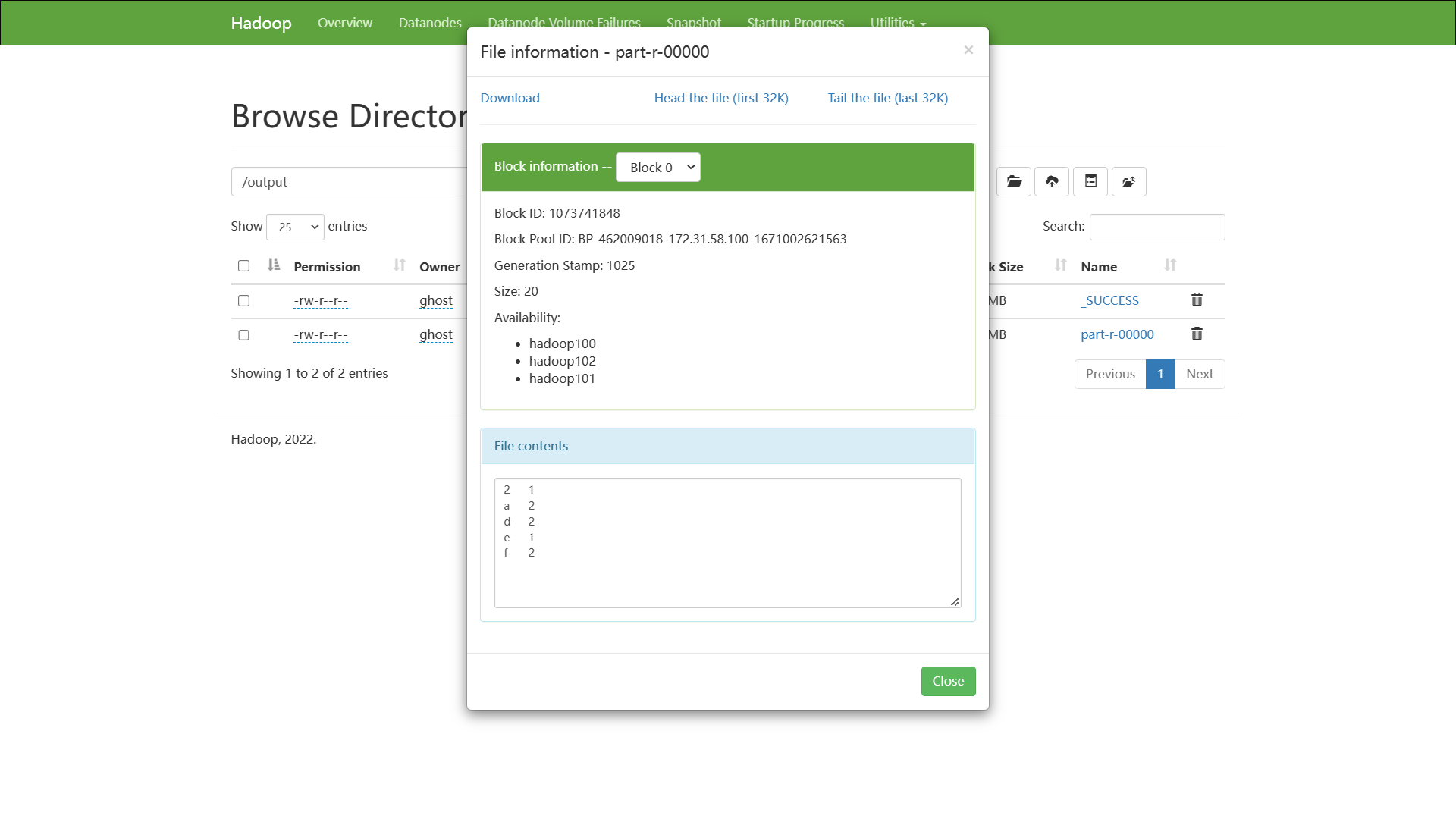
part-r-00000:其中包含 r 代表的是 reduce 的结果;